


WildCraft: Animal Sim Online
4.565.06K Reviews
App Specs
- Version
- Varies with Device
- Updated On
- License
- Free
- Downloads
- 100,000,000+
- Developer
- Turbo Rocket Games
- Categories
- Simulation
- Platform
- Android, iOS
Screenshots
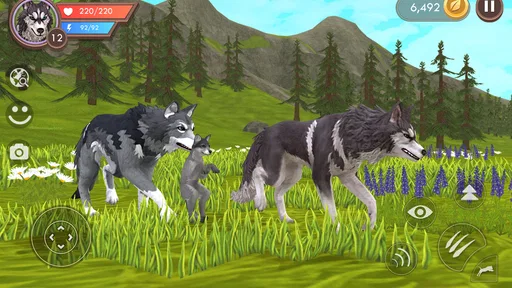
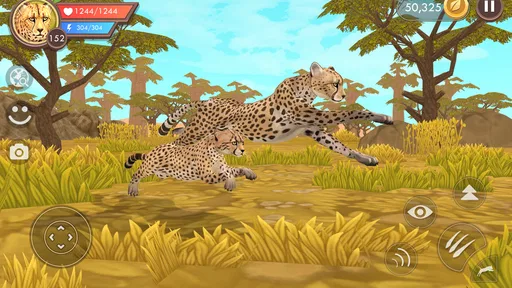
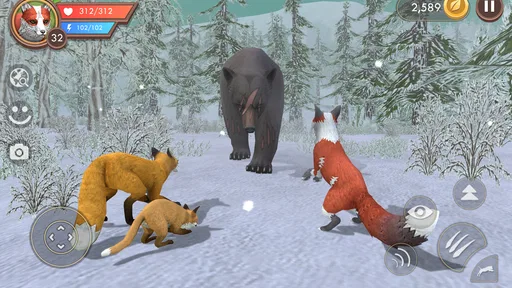
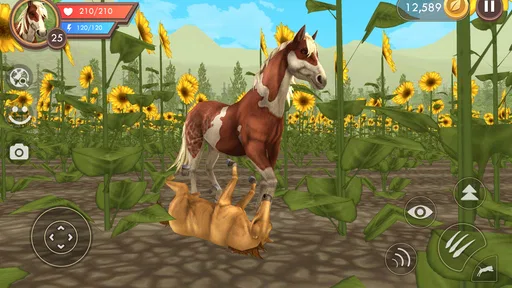
 Analysis by AppCompare
I think WildCraft: Animal Sim Online works best as a shared-device game when everyone treats it as one player’s activity at a time. Its animal role-play and open exploration are easy to understand, so a sibling or friend can quickly get the appeal by watching. But a shared screen does not necessarily mean a shared game identity: before passing the device around, agree on whose progress and choices are being used. That small bit of coordination can prevent a casual handoff from turning into an argument over a character or saved progress.
Making a shared session work
For a household routine, I would keep sessions simple: one person plays while the other watches, then they swap only after finishing a clear stopping point. Exploration and quests can make it tempting to keep going, so deciding in advance when to hand over the device is more practical than trying to divide every minute of play. It also gives younger players a chance to ask questions about what they see rather than rushing through the game just to claim a turn.
There is a useful distinction between sharing the device and sharing responsibility for the game. I would not assume that another household member can safely make changes or continue exactly where they expect without first checking which profile or account is active. If several people want their own ongoing experience, use separate profiles where the device and game support them, and confirm that the right one is selected before starting. I would avoid treating a single character as a communal save unless everyone is happy with the same choices.
Agree on turns before the pack sets off
Because the game includes multiplayer and communication with other players, coordination matters beyond the living room. If a child is playing while an adult is nearby, a helpful routine is to talk through whether the session is solo or social before entering a shared activity. That conversation is not a substitute for checking the game’s current settings, but it helps everyone understand what kind of play is happening and who is making decisions.
For a quick after-school break, I would choose a modest goal rather than starting with the expectation of finishing a long stretch of play. A player might explore, work on a quest, or simply show a family member the animal they chose, then stop at a natural pause. This makes the game easier to fit around homework, meals, or a shared tablet schedule. It also avoids the frustrating feeling that someone else has taken over in the middle of a task.
Who will enjoy its style—and who may not
WildCraft is a natural fit for players who like inhabiting an animal character, roaming through outdoor settings, and taking on goals at a relaxed pace. It can also suit someone who enjoys having a social option available without making every session depend on a group. On the other hand, players who want tightly directed levels, a fast competitive match, or a purely offline experience may prefer a different kind of simulation game. The freedom to explore is part of the appeal, but it will feel less focused to anyone who wants constant, clearly staged action.
Compared with animal games built mainly around caring for a pet or decorating a habitat, this one puts more emphasis on moving through a wild environment, completing challenges, and playing alongside others. Compared with competitive action games, its animal-life framing and exploration give it a gentler feel, though hunting and defending territory still create moments of pressure. That mix is worth considering for younger players and for adults choosing a game to share: it is not simply a quiet virtual pet, nor is it just a quick battle game.
Worth Reading Before You Choose

Flipboard Shows What News Apps Must Do Beyond the Feed

Switching to Android Auto Means Rethinking Your Driving Routine

Google Calendar Makes a Crowded Week Easier to Manage

Ludo King Makes the Most of the Minutes Between Plans

Baby Panda World Brings Quick Play to Modern Phones, but Its Game Library Feels Busy

ESPN’s Live Game View Makes Following Close Games Easier
Age, trust, and practical expectations
The game is rated Everyone 10+, which gives families a useful starting point when deciding whether it suits a particular child. I would still look at the actual play style together rather than relying on an age label alone, especially because online interaction is part of the experience. A brief conversation about not sharing personal information and about leaving an uncomfortable conversation is sensible for any game with a social component. Adults can also ask a child to show them how they use the chat, instead of assuming that the feature will be used in one particular way.
The game is free to download, with in-app purchases ranging from $0.99 to $99.99 per item. That makes it worth setting a clear household rule before handing over a device: purchases should only happen with the account holder’s permission. If a child is playing, I would check the device’s purchase settings and explain that seeing an item in a game does not mean it is included at no cost. The game can be tried without paying upfront, but optional spending is a real consideration for a shared family device.
One non-obvious trade-off in a shared household is that social play can be more appealing when friends are available, while a solo session is easier to fit around another person’s schedule. I would not promise a child that a friend will always be available or that a group session will end on a convenient timer. Instead, agree on a backup plan: if nobody else is ready, the player can explore alone or stop and return later. That keeps coordination from becoming the main source of disappointment.
Small habits that make play smoother
First, let a new player spend a little time learning how movement and objectives feel before joining a group. That reduces the chance that a younger or less experienced player will feel lost while others are waiting. Second, when taking turns, have the outgoing player explain what they were doing rather than making the next person guess. Third, if the device is about to be needed for something else, agree on the handoff before starting a fresh activity. These are simple habits, but they suit a game where exploring and social play can make it easy to lose track of time.
I would also treat character customization as a personal preference rather than a shared checklist. One player may care about choosing a particular animal or look, while another may be more interested in getting straight to exploration. Letting each person make their own choices, where separate play identities are available, avoids turning customization into a household negotiation. If the game is being used under one identity, agree beforehand that choices may affect what the next player sees.
Turbo Rocket Games has built a simulation with a broad audience: it has a 4.5 average from around 1.2 million ratings and over 100 million installs. Those figures suggest that it has reached plenty of players, but popularity does not guarantee it will suit every family. I would use them as context, not as a reason to skip trying a short session together. The best test is whether the people sharing the device enjoy the pace, understand the social side, and can agree on boundaries around turns and spending.
On Android, the listed minimum operating system is version 6.0. If you are choosing an older household device, checking that it meets this requirement is a practical first step before planning a shared session. WildCraft is free to start, but it is not automatically a good fit for every device routine: online play, optional purchases, and multiple people wanting their own progress all call for a little planning. For a household that is comfortable with those points, it can be a pleasant game to watch and take turns playing.
Gameplay and Features
The game’s mechanics are as straightforward as they come, making it easy to jump right into the action. You’ll start off in a serene forest environment, perfect for getting your bearings. As you explore, you’ll encounter various quests and challenges, which are key to leveling up your character.
One of the things I absolutely love is the multiplayer aspect. You can team up with players from around the globe to tackle missions and explore together. It’s not just about running solo; the game encourages you to form packs or families, which brings an exciting layer of strategy and camaraderie.
Graphics and Sound
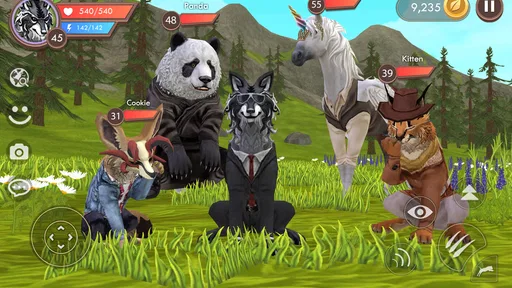
The visuals in WildCraft are a feast for the eyes. The environments are beautifully rendered, with lush forests, open plains, and snowy mountains that make exploring a joy. The attention to detail in the animal designs is impressive, and the animations are smooth and lifelike.
Sound-wise, the game doesn’t disappoint either. The ambient sounds of nature and the realistic animal noises immerse you in the wild, making the experience all the more authentic. It’s like having the wilderness right in your pocket!
Challenges and Rewards
As you progress, you’ll face a variety of challenges, from hunting prey to defending your territory against other animals. These tasks are not only fun but also essential for gaining experience points and advancing your character. The rewards system is generous, providing you with plenty of incentives to keep playing and exploring.
One of the most exciting aspects is the ability to raise a family. Once you reach a certain level, you can find a mate and have cubs. Watching your family grow and teaching your offspring the ways of the wild adds a heartwarming and engaging dimension to the game.
Community and Social Elements
The community in WildCraft is vibrant and active. Whether you’re teaming up for a hunt or just chatting with other players, the social aspect adds a lot of depth. The game provides a chat function that lets you communicate easily with your pack or other players in the game. It’s a great way to make new friends and share strategies.
So, if you’re looking for a game that offers both excitement and a sense of community, WildCraft has got you covered.
Final Thoughts
In a nutshell, WildCraft: Animal Sim Online is a delightful escape into the wild. With its stunning graphics, engaging gameplay, and vibrant community, it’s a game that will keep you coming back for more. Whether you’re a casual gamer or a hardcore animal lover, there’s something here for everyone.
So what are you waiting for? If you haven’t tried it yet, grab your device, download the game, and unleash your inner animal. After all, the wild is calling!
Pros
- Engaging open-world exploration.
- Beautifully detailed animal graphics.
- Multiplayer mode for team play.
- Varied animal selection to explore.
- Regular updates with new features.
Cons
- In-app purchases can be costly.
- Occasional connectivity issues.
- Controls can be tricky for beginners.
- Some animations may glitch.
- Limited offline gameplay options.
FAQs for WildCraft: Animal Sim Online
What is WildCraft: Animal Sim Online?
WildCraft: Animal Sim Online is an immersive simulation game where players can explore a vast world as various wild animals. Players can build families, raise cubs, and complete quests in different environments, offering a unique experience of life in the wild. The game also features multiplayer options for interactive gameplay.
Is WildCraft suitable for children?
WildCraft is designed to be family-friendly, making it suitable for children. However, it does contain elements of survival and mild animal combat which parents should consider. The game also includes online multiplayer interactions, so parental supervision is recommended to ensure a safe experience.
What platforms are supported by WildCraft?
WildCraft: Animal Sim Online is available on both Android and iOS platforms. It can be downloaded from the Google Play Store and Apple App Store, ensuring easy access for users of most mobile devices. Ensure your device meets the app's system requirements for optimal performance.
Does WildCraft require an internet connection to play?
While WildCraft can be played offline, certain features, such as the multiplayer mode and some events, require an internet connection. Playing online enhances the experience by allowing players to interact with others, participate in events, and unlock special content, enriching the gameplay.
Are there in-app purchases in WildCraft?
Yes, WildCraft offers in-app purchases. Players can buy items, skins, and upgrades to enhance their game experience. While the game is free to download and play, these purchases are optional and can provide additional customization and progression opportunities within the game.


